
Como acionar os botões de uma calculadora através do teclado

29 respostas
ViniGodoy

Um dos exercícios favoritos de vários professores de Java é pedir para o aluno criar uma calculadora. Tudo vai bem, até que o aluno resolve fazer com que os botões sejam automaticamente acionados pelo teclado. Então, o inferno começa.

Por que? Simplesmente, porque o local adequado para tratar esse tipo de evento não é nos KeyListeners, que provavelmente foram ensinados em sala de aula. Um keylistener só trata a ação de tecla no componente onde foi pressionado, logo, seria necessário incluir keylisteners de todas as teclas, em todos os componentes, o que não é nada prático.

Então, qual seria o local certo? Como dizer para o Java tratar teclas que foram pressionadas “no geral”?

Todo componente Swing tem associado a ele dois mapas. O InputMap e o ActionMap. O InputMap associa uma tecla a um nome, enquanto o ActionMap associa esse nome a uma ação. Os componentes tem três tipos de InputMaps:

  1. WHEN_IN_FOCUSED_WINDOW: Dispara sempre que a tecla é pressionada quando a janela estiver em foco. Não importa se sobre o componente ou não.
  2. WHEN_FOCUSED: Dispara quando a tecla foi pressionada no momento em que o componente estava em foco;
  3. WHEN_ANCESTOR_OF_FOCUSED_COMPONENT: Dispara quando uma tecla foi pressionada no ancestral imediato do componente, geralmente, o painel onde o componente está.

No caso da calculadora, nos interessa o primeiro caso.

O código abaixo, cria um painel, tipico de todas as aplicações de calculadora, e associa a esse painel os botões de 0 até 9.
Para cada botão é criada uma ação, correspondente ao pressionar de sua tecla. Essa ação é associada primeiramente ao próprio botão, pois será disparada também quando o botão for clicado.

Depois, criamos um apelido para cada ação no painel principal da calculadora. E, então, associamos esse apelido ao pressionar das teclas 0 até 9, tanto do teclado principal, quanto do teclado numérico. Como a ação será disparada sempre que a janela estiver em foco, usamos para isso o InputMap WHEN_IN_FOCUSED_WINDOW.

Os demais botões foram deixados sem função. Desculpe decepcionar quem veio aqui em busca da solução completa desse exercício, mas a idéia desse tópico foi simplesmente fazer com que os alunos dedicados parem de perder suas noites de sono nessa funcionalidade e não resolver o problema da calculadora em si.

O ActionMap e o InputMap também são ideais para registrar eventos em jogos.

import java.awt.BorderLayout;
import java.awt.EventQueue;
import java.awt.GridLayout;
import java.awt.event.ActionEvent;

import javax.swing.AbstractAction;
import javax.swing.ActionMap;
import javax.swing.InputMap;
import javax.swing.JButton;
import javax.swing.JFrame;
import javax.swing.JPanel;
import javax.swing.JTextField;
import javax.swing.KeyStroke;

public class CalculadoraFrame extends JFrame 
{
	private JPanel pnlPrincipal;
	private JTextField txtVisor;
	private JPanel pnlBotoes;
	
	//Criação das ações dos botões.
	private BotaoNumericoAction acaoBotao1 = new BotaoNumericoAction(1);
	private BotaoNumericoAction acaoBotao2 = new BotaoNumericoAction(2);
	private BotaoNumericoAction acaoBotao3 = new BotaoNumericoAction(3);
	private BotaoNumericoAction acaoBotao4 = new BotaoNumericoAction(4);
	private BotaoNumericoAction acaoBotao5 = new BotaoNumericoAction(5);
	private BotaoNumericoAction acaoBotao6 = new BotaoNumericoAction(6);
	private BotaoNumericoAction acaoBotao7 = new BotaoNumericoAction(7);
	private BotaoNumericoAction acaoBotao8 = new BotaoNumericoAction(8);	
	private BotaoNumericoAction acaoBotao9 = new BotaoNumericoAction(9);
	private BotaoNumericoAction acaoBotao0 = new BotaoNumericoAction(0);

	public CalculadoraFrame()
	{
		super("Calculadora");
		setContentPane(getPnlPrincipal());
		setSize(200,250);
		setLocationRelativeTo(null);
		setDefaultCloseOperation(JFrame.EXIT_ON_CLOSE);
	}

	private JPanel getPnlPrincipal() {
		if (pnlPrincipal != null)
			return pnlPrincipal;
		
		pnlPrincipal = new JPanel(new BorderLayout());
		pnlPrincipal.add(getTxtVisor(), BorderLayout.NORTH);
		pnlPrincipal.add(getPnlBotoes(), BorderLayout.CENTER);
		registrarAcoesDoTeclado(pnlPrincipal);
		return pnlPrincipal;
	}

	private JTextField getTxtVisor() {
		if (txtVisor != null)
			return txtVisor;
		
		txtVisor = new JTextField();
		txtVisor.setEditable(false);
		txtVisor.setHorizontalAlignment(JTextField.RIGHT);
		return txtVisor;
	}
	
	private JPanel getPnlBotoes() {
		if (pnlBotoes != null)
			return pnlBotoes;
		pnlBotoes = new JPanel();
		pnlBotoes.setLayout(new GridLayout(4,4));
		
		//Associamos os botões as suas respectivas ações.
		//Isso só associará a ação ao clique do botão.
		pnlBotoes.add(new JButton(acaoBotao7));
		pnlBotoes.add(new JButton(acaoBotao8));
		pnlBotoes.add(new JButton(acaoBotao9));
		pnlBotoes.add(new JButton("/"));

		pnlBotoes.add(new JButton(acaoBotao4));
		pnlBotoes.add(new JButton(acaoBotao5));
		pnlBotoes.add(new JButton(acaoBotao6));
		pnlBotoes.add(new JButton("*"));

		pnlBotoes.add(new JButton(acaoBotao1));
		pnlBotoes.add(new JButton(acaoBotao2));
		pnlBotoes.add(new JButton(acaoBotao3));
		pnlBotoes.add(new JButton("-"));
		
		pnlBotoes.add(new JButton(acaoBotao0));
		pnlBotoes.add(new JButton("C"));
		pnlBotoes.add(new JButton("="));
		pnlBotoes.add(new JButton("+"));

		return pnlBotoes;
	}
	
	//Ações para o botão numérico. Ela simplesmente concatena o número ao final 
	//do texto do visor.
	private class BotaoNumericoAction extends AbstractAction
	{
		private int numero;

		public BotaoNumericoAction(int numero)
		{
			super(Integer.toString(numero));
			this.numero = numero;
		}

		@Override
		public void actionPerformed(ActionEvent e) {
			getTxtVisor().setText(getTxtVisor().getText() + numero);
		}
	}
	
	private void registrarAcoesDoTeclado(JPanel painel) {
		//Damos um nome para cada ação. Esse nome é útil pois mais de 
		//uma tecla pode ser associada a cada ação, como veremos abaixo
		ActionMap actionMap = painel.getActionMap();
		actionMap.put("botao1", acaoBotao1);
		actionMap.put("botao2", acaoBotao2);
		actionMap.put("botao3", acaoBotao3);
		actionMap.put("botao4", acaoBotao4);
		actionMap.put("botao5", acaoBotao5);
		actionMap.put("botao6", acaoBotao6);
		actionMap.put("botao7", acaoBotao7);
		actionMap.put("botao8", acaoBotao8);
		actionMap.put("botao9", acaoBotao9);
		actionMap.put("botao0", acaoBotao0);
		painel.setActionMap(actionMap);
		
		//Pegamos o input map que ocorre sempre que a janela atual está em foco
		InputMap imap = painel.getInputMap(JPanel.WHEN_IN_FOCUSED_WINDOW);
		
		//Associamos o pressionar das teclas (keystroke) aos eventos.
		//O nome do KeyStroke pode ser obtido através da classe KeyEvent.
		//Lá está cheio de constantes como KeyEvent.VK_NUMPAD1. 
		//Essa string é o nome sem o VK_
		
		//Teclas da parte de cima do teclado.
		imap.put(KeyStroke.getKeyStroke("1"), "botao1");
		imap.put(KeyStroke.getKeyStroke("2"), "botao2");
		imap.put(KeyStroke.getKeyStroke("3"), "botao3");
		imap.put(KeyStroke.getKeyStroke("4"), "botao4");
		imap.put(KeyStroke.getKeyStroke("5"), "botao5");
		imap.put(KeyStroke.getKeyStroke("6"), "botao6");
		imap.put(KeyStroke.getKeyStroke("7"), "botao7");
		imap.put(KeyStroke.getKeyStroke("8"), "botao8");
		imap.put(KeyStroke.getKeyStroke("9"), "botao9");
		imap.put(KeyStroke.getKeyStroke("0"), "botao0");	
		
		//Botões do teclado numérico
		imap.put(KeyStroke.getKeyStroke("NUMPAD1"), "botao1");
		imap.put(KeyStroke.getKeyStroke("NUMPAD2"), "botao2");
		imap.put(KeyStroke.getKeyStroke("NUMPAD3"), "botao3");
		imap.put(KeyStroke.getKeyStroke("NUMPAD4"), "botao4");
		imap.put(KeyStroke.getKeyStroke("NUMPAD5"), "botao5");
		imap.put(KeyStroke.getKeyStroke("NUMPAD6"), "botao6");
		imap.put(KeyStroke.getKeyStroke("NUMPAD7"), "botao7");
		imap.put(KeyStroke.getKeyStroke("NUMPAD8"), "botao8");
		imap.put(KeyStroke.getKeyStroke("NUMPAD9"), "botao9");
		imap.put(KeyStroke.getKeyStroke("NUMPAD0"), "botao0");	
	}
	
	public static void main(String[] args) {
		EventQueue.invokeLater(new Runnable()
		{
			@Override
			public void run() {
				new CalculadoraFrame().setVisible(true);
			}
		});
	}	
}

Obviamente, muito código poderá ser reduzido usando a instrução for. Mas preferi deixar de maneira mais explícita, por ser mais didático.

29 Respostas

AlissonGuj

resolvido

ViniGodoy

Na verdade, isso já foi tão perguntado aqui no GUJ, que resolvi criar esse tópico e adicionar aos meus favoritos.
Agora já tenho um local para linkar quando a dúvida surgir no futuro (e vai surgir). :wink:

AlissonGuj

aham

Ultralogic

Pode crer parcero
Bom, obrigado por sua ajuda
ate mais
Flwww

gabrielmskate

Esse post deveria passar para os Artigos!!!
Muito bom.

ArchV

gabrielmskate:
Esse post deveria passar para os Artigos!!!
Muito bom.

Concordo.

Este tópico já me ajudou muito.

Naum_Jefferson

ArchV:
gabrielmskate:
Esse post deveria passar para os Artigos!!!
Muito bom.

Concordo.

Este tópico já me ajudou muito.

Concordo[2].

Hellmanss

Vini, seguindo os seus artigos no Ponto V, implementei os exemplos propostos e em cima dos mesmos começei a fazer alterações e cheguei em um ponto parecido…

Para implementar eventos de teclas apertadas simultaneamente, esse método que você implementou acima resolve?

UMC

Boa Viny!
Parabéns!
D+
:smiley: :smiley:
vlw

ViniGodoy

Hellmanss:
Vini, seguindo os seus artigos no Ponto V, implementei os exemplos propostos e em cima dos mesmos começei a fazer alterações e cheguei em um ponto parecido…

Para implementar eventos de teclas apertadas simultaneamente, esse método que você implementou acima resolve?

No caso de jogos, você precisa tratar os eventos de KeyDown e KeyUp mesmo. Até pq geralmente vc precisa saber que essas teclas se mantiveram pressionadas.

M

Muito bom o post.
Me ajudou. Funciona certinho. Visitei este exemplo tb: http://www.daniweb.com/forums/thread125682.html, funciona certinho.
Mas tenho a seguinte dificuldade. Se eu usar o NetBenas para gerar o código automaticamente, como posso adicionar um listener no meu formulario? Tentei colocar o evento keyPressed, keyTyped, keyReleased direto no código e também colocar os eventos de forma visual pelas propriedades do formulário, dai ele cria: formKeyReleased, formKeyPressed e formKeyTyped, mas nenhum deles funciona. Preciso que quando o usuario clique no botão chame uma função. Por enquanto estou apenas tentando fazer aparecer uma menssagem na tela, usando JOptionPane.showMessageDialog.

J

Este tópico realmente foi muito esclarecedor. Parabéns Vini.

leorocco

colega, e se eu usar ao inves de um JPanel, um JFrame?

E

Olá! Gostaria de ajuda no seguinte problema.

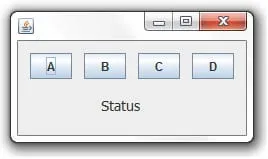
Tenho um JFrame com 4 JButton nomeados de A, B, C e D respectivamente, e um JLabel nomeado de status.

Quero que cada JButton possa setar um texto no JLabel. Até ai tudo bem, já fiz isso.
No caso, ao clicar em A o texto do JLabel muda para “A” e assim sucessivamente.

Agora preciso que cada JButton responda a sua respectiva letra do teclado.
Exemplo: Ao pressionar a tecla C, o JLabel mude para “C”. Ao pressionar a tecla A, o JLabel mude para “A”. Sem que o foco esteja sobre o JButton correspondente.

Desde já, agradeço pela ajuda.
No aguardo…

ViniGodoy

E qual é o problema? Basta usar o que descrevo no primeiro post.

discorpio

Boa noite.

ViniGodoy, gostaria de lhe dar uma opinião, a de fixar este post por alguns meses no início do Fórum, porque sei que certamente, como você disse, haverá dúvidas no futuro.

Um abraço.

T

Vini,
Tenho uma duvida: na minha aplicacao gostaria de tratar somente a tecla ‘alt’ sem combinacao com outras teclas, no evento keyPressed e keyRelease do Jpanel. No JtextField eu consigo, mas no Jpanel nao.
Tentei usar sua solucao e funcionou perfeitamente para a combinacao de ‘alt’ + outra tecla, porem sem ser combinada, ou seja, pressionando somente ‘alt’ nao funcionou.

Vc teria alguma outra sugestao?

Desde já agradeço a atencao.

A

AlissonGuj:
resolvido

Consegui perceber como acionar os botões de uma calculadora através do teclado.
Mas o outro problema é controlar a última entrada de um dado numérico, separa-lo dos sinais de operação para efetuar a operação com próximo número.
Por favor ajudem aí.

ViniGodoy

Repetindo:

Desculpe, mas não fazemos lição de casa.

Eu nunca tive a intenção de mostrar como resolver os problemas efetivamente relacionados ao trabalho escolar de “fazer uma calculadora”.

O tópico serve só para ajudar a resolver esse problema específico, que não é óbvio, não é ensinado nas aulas básicas de Swing, mas que acaba incomodando bastante quem se dedida.

Consulte o material do seu professor para o resto, pois lá deve ter informação suficiente para concluir o trabalo.

abymaelll

Gostei muito da explicação, mas esto precisando de implementar a mesma coisa usando Javafx e não to conseguindo, por favor me ajudem!!!

B

Olá, sei que não deveria ressucitar um tópico escrito a muito tempo, porem fiz uma calculadora, e gostaria que ela funcionasse atraves do teclado, e tentei implementar esse codigo, não obtive exito, será que alguem pode me ajudar? Segue meu código abaixo

private BotaoNumericoAction acaoBotao1 = new BotaoNumericoAction(1);  
/*
  Antonio Augusto
  Daniel Brandão
  Rérison Augusto
  Ricardo Mendes
  Calculadora em Java
  3º Módulo Informática - 2015
  Quatá - SP
*/
package br.com.etec.Calculadora;

import java.awt.event.KeyEvent;

public class JFCalculadora extends javax.swing.JFrame {

    char operacao;
    String temp;
    double num1, num2, resultado;
    boolean click = false;
    
    public JFCalculadora() {
        initComponents();
    }

    /**
     * This method is called from within the constructor to initialize the form.
     * WARNING: Do NOT modify this code. The content of this method is always
     * regenerated by the Form Editor.
     */
    @SuppressWarnings("unchecked")
    // <editor-fold defaultstate="collapsed" desc="Generated Code">                          
    private void initComponents() {

        jButton21 = new javax.swing.JButton();
        jButton24 = new javax.swing.JButton();
        jPanel1 = new javax.swing.JPanel();
        jVisor = new javax.swing.JTextField();
        jBBsp = new javax.swing.JButton();
        jB7 = new javax.swing.JButton();
        jB4 = new javax.swing.JButton();
        jB1 = new javax.swing.JButton();
        jB0 = new javax.swing.JButton();
        jBCE = new javax.swing.JButton();
        jB8 = new javax.swing.JButton();
        jB5 = new javax.swing.JButton();
        jB2 = new javax.swing.JButton();
        jBPonto = new javax.swing.JButton();
        jBC = new javax.swing.JButton();
        jB9 = new javax.swing.JButton();
        jB6 = new javax.swing.JButton();
        jB3 = new javax.swing.JButton();
        jBIgual = new javax.swing.JButton();
        jBMaisMenos = new javax.swing.JButton();
        jBDiv = new javax.swing.JButton();
        jBMult = new javax.swing.JButton();
        jBMenos = new javax.swing.JButton();
        jBMais = new javax.swing.JButton();
        jBRaiz = new javax.swing.JButton();
        jBPorc = new javax.swing.JButton();

        jButton21.setText("jButton21");

        jButton24.setText("jButton24");

        setDefaultCloseOperation(javax.swing.WindowConstants.EXIT_ON_CLOSE);

        jPanel1.addKeyListener(new java.awt.event.KeyAdapter() {
            public void keyPressed(java.awt.event.KeyEvent evt) {
                jPanel1KeyPressed(evt);
            }
        });

        jVisor.setEditable(false);
        jVisor.setHorizontalAlignment(javax.swing.JTextField.RIGHT);

        jBBsp.setText("<");
        jBBsp.addActionListener(new java.awt.event.ActionListener() {
            public void actionPerformed(java.awt.event.ActionEvent evt) {
                jBBspActionPerformed(evt);
            }
        });

        jB7.setText("7");
        jB7.addActionListener(new java.awt.event.ActionListener() {
            public void actionPerformed(java.awt.event.ActionEvent evt) {
                jB7ActionPerformed(evt);
            }
        });

        jB4.setText("4");
        jB4.addActionListener(new java.awt.event.ActionListener() {
            public void actionPerformed(java.awt.event.ActionEvent evt) {
                jB4ActionPerformed(evt);
            }
        });

        jB1.setText("1");
        jB1.addActionListener(new java.awt.event.ActionListener() {
            public void actionPerformed(java.awt.event.ActionEvent evt) {
                jB1ActionPerformed(evt);
            }
        });

        jB0.setText("0");
        jB0.addActionListener(new java.awt.event.ActionListener() {
            public void actionPerformed(java.awt.event.ActionEvent evt) {
                jB0ActionPerformed(evt);
            }
        });

        jBCE.setText("CE");
        jBCE.addActionListener(new java.awt.event.ActionListener() {
            public void actionPerformed(java.awt.event.ActionEvent evt) {
                jBCEActionPerformed(evt);
            }
        });

        jB8.setText("8");
        jB8.addActionListener(new java.awt.event.ActionListener() {
            public void actionPerformed(java.awt.event.ActionEvent evt) {
                jB8ActionPerformed(evt);
            }
        });

        jB5.setText("5");
        jB5.addActionListener(new java.awt.event.ActionListener() {
            public void actionPerformed(java.awt.event.ActionEvent evt) {
                jB5ActionPerformed(evt);
            }
        });

        jB2.setText("2");
        jB2.addActionListener(new java.awt.event.ActionListener() {
            public void actionPerformed(java.awt.event.ActionEvent evt) {
                jB2ActionPerformed(evt);
            }
        });

        jBPonto.setText(".");
        jBPonto.addActionListener(new java.awt.event.ActionListener() {
            public void actionPerformed(java.awt.event.ActionEvent evt) {
                jBPontoActionPerformed(evt);
            }
        });

        jBC.setText("C");
        jBC.addActionListener(new java.awt.event.ActionListener() {
            public void actionPerformed(java.awt.event.ActionEvent evt) {
                jBCActionPerformed(evt);
            }
        });

        jB9.setText("9");
        jB9.addActionListener(new java.awt.event.ActionListener() {
            public void actionPerformed(java.awt.event.ActionEvent evt) {
                jB9ActionPerformed(evt);
            }
        });

        jB6.setText("6");
        jB6.addActionListener(new java.awt.event.ActionListener() {
            public void actionPerformed(java.awt.event.ActionEvent evt) {
                jB6ActionPerformed(evt);
            }
        });

        jB3.setText("3");
        jB3.addActionListener(new java.awt.event.ActionListener() {
            public void actionPerformed(java.awt.event.ActionEvent evt) {
                jB3ActionPerformed(evt);
            }
        });

        jBIgual.setText("=");
        jBIgual.addActionListener(new java.awt.event.ActionListener() {
            public void actionPerformed(java.awt.event.ActionEvent evt) {
                jBIgualActionPerformed(evt);
            }
        });

        jBMaisMenos.setText("+/-");
        jBMaisMenos.addActionListener(new java.awt.event.ActionListener() {
            public void actionPerformed(java.awt.event.ActionEvent evt) {
                jBMaisMenosActionPerformed(evt);
            }
        });

        jBDiv.setText("/");
        jBDiv.addActionListener(new java.awt.event.ActionListener() {
            public void actionPerformed(java.awt.event.ActionEvent evt) {
                jBDivActionPerformed(evt);
            }
        });

        jBMult.setText("*");
        jBMult.addActionListener(new java.awt.event.ActionListener() {
            public void actionPerformed(java.awt.event.ActionEvent evt) {
                jBMultActionPerformed(evt);
            }
        });

        jBMenos.setText("-");
        jBMenos.addActionListener(new java.awt.event.ActionListener() {
            public void actionPerformed(java.awt.event.ActionEvent evt) {
                jBMenosActionPerformed(evt);
            }
        });

        jBMais.setText("+");
        jBMais.addActionListener(new java.awt.event.ActionListener() {
            public void actionPerformed(java.awt.event.ActionEvent evt) {
                jBMaisActionPerformed(evt);
            }
        });

        jBRaiz.setText("&#8730;¯");
        jBRaiz.addActionListener(new java.awt.event.ActionListener() {
            public void actionPerformed(java.awt.event.ActionEvent evt) {
                jBRaizActionPerformed(evt);
            }
        });

        jBPorc.setText("%");
        jBPorc.addActionListener(new java.awt.event.ActionListener() {
            public void actionPerformed(java.awt.event.ActionEvent evt) {
                jBPorcActionPerformed(evt);
            }
        });

        javax.swing.GroupLayout jPanel1Layout = new javax.swing.GroupLayout(jPanel1);
        jPanel1.setLayout(jPanel1Layout);
        jPanel1Layout.setHorizontalGroup(
            jPanel1Layout.createParallelGroup(javax.swing.GroupLayout.Alignment.LEADING)
            .addGroup(jPanel1Layout.createSequentialGroup()
                .addContainerGap()
                .addGroup(jPanel1Layout.createParallelGroup(javax.swing.GroupLayout.Alignment.LEADING)
                    .addComponent(jVisor)
                    .addGroup(jPanel1Layout.createSequentialGroup()
                        .addGroup(jPanel1Layout.createParallelGroup(javax.swing.GroupLayout.Alignment.LEADING, false)
                            .addGroup(jPanel1Layout.createSequentialGroup()
                                .addComponent(jBBsp)
                                .addPreferredGap(javax.swing.LayoutStyle.ComponentPlacement.RELATED)
                                .addComponent(jBCE)
                                .addPreferredGap(javax.swing.LayoutStyle.ComponentPlacement.RELATED)
                                .addComponent(jBC)
                                .addPreferredGap(javax.swing.LayoutStyle.ComponentPlacement.RELATED)
                                .addComponent(jBRaiz))
                            .addGroup(jPanel1Layout.createSequentialGroup()
                                .addComponent(jB7)
                                .addPreferredGap(javax.swing.LayoutStyle.ComponentPlacement.RELATED)
                                .addComponent(jB8)
                                .addPreferredGap(javax.swing.LayoutStyle.ComponentPlacement.RELATED)
                                .addComponent(jB9)
                                .addPreferredGap(javax.swing.LayoutStyle.ComponentPlacement.RELATED)
                                .addComponent(jBDiv))
                            .addGroup(jPanel1Layout.createSequentialGroup()
                                .addComponent(jB4)
                                .addPreferredGap(javax.swing.LayoutStyle.ComponentPlacement.RELATED)
                                .addComponent(jB5)
                                .addPreferredGap(javax.swing.LayoutStyle.ComponentPlacement.RELATED)
                                .addComponent(jB6)
                                .addPreferredGap(javax.swing.LayoutStyle.ComponentPlacement.RELATED)
                                .addComponent(jBMult))
                            .addGroup(jPanel1Layout.createSequentialGroup()
                                .addComponent(jB1)
                                .addPreferredGap(javax.swing.LayoutStyle.ComponentPlacement.RELATED)
                                .addComponent(jB2)
                                .addPreferredGap(javax.swing.LayoutStyle.ComponentPlacement.RELATED)
                                .addComponent(jB3)
                                .addPreferredGap(javax.swing.LayoutStyle.ComponentPlacement.RELATED)
                                .addComponent(jBMenos))
                            .addGroup(jPanel1Layout.createSequentialGroup()
                                .addComponent(jB0)
                                .addPreferredGap(javax.swing.LayoutStyle.ComponentPlacement.RELATED)
                                .addComponent(jBPonto)
                                .addPreferredGap(javax.swing.LayoutStyle.ComponentPlacement.RELATED)
                                .addComponent(jBMaisMenos)
                                .addPreferredGap(javax.swing.LayoutStyle.ComponentPlacement.RELATED, javax.swing.GroupLayout.DEFAULT_SIZE, Short.MAX_VALUE)
                                .addComponent(jBPorc)))
                        .addPreferredGap(javax.swing.LayoutStyle.ComponentPlacement.RELATED)
                        .addGroup(jPanel1Layout.createParallelGroup(javax.swing.GroupLayout.Alignment.LEADING)
                            .addGroup(jPanel1Layout.createSequentialGroup()
                                .addComponent(jBIgual)
                                .addGap(0, 0, Short.MAX_VALUE))
                            .addGroup(jPanel1Layout.createSequentialGroup()
                                .addGap(0, 0, Short.MAX_VALUE)
                                .addComponent(jBMais)))))
                .addContainerGap())
        );

        jPanel1Layout.linkSize(javax.swing.SwingConstants.HORIZONTAL, new java.awt.Component[] {jB0, jB1, jB2, jB3, jB4, jB5, jB6, jB7, jB8, jB9, jBBsp, jBC, jBCE, jBDiv, jBIgual, jBMais, jBMaisMenos, jBMenos, jBMult, jBPonto, jBPorc, jBRaiz});

        jPanel1Layout.setVerticalGroup(
            jPanel1Layout.createParallelGroup(javax.swing.GroupLayout.Alignment.LEADING)
            .addGroup(jPanel1Layout.createSequentialGroup()
                .addContainerGap()
                .addComponent(jVisor, javax.swing.GroupLayout.PREFERRED_SIZE, javax.swing.GroupLayout.DEFAULT_SIZE, javax.swing.GroupLayout.PREFERRED_SIZE)
                .addGap(18, 18, 18)
                .addGroup(jPanel1Layout.createParallelGroup(javax.swing.GroupLayout.Alignment.LEADING, false)
                    .addGroup(jPanel1Layout.createSequentialGroup()
                        .addGroup(jPanel1Layout.createParallelGroup(javax.swing.GroupLayout.Alignment.BASELINE)
                            .addComponent(jBBsp)
                            .addComponent(jBCE)
                            .addComponent(jBC)
                            .addComponent(jBRaiz))
                        .addPreferredGap(javax.swing.LayoutStyle.ComponentPlacement.RELATED)
                        .addGroup(jPanel1Layout.createParallelGroup(javax.swing.GroupLayout.Alignment.BASELINE)
                            .addComponent(jB7)
                            .addComponent(jB8)
                            .addComponent(jB9)
                            .addComponent(jBDiv)))
                    .addComponent(jBMais, javax.swing.GroupLayout.DEFAULT_SIZE, javax.swing.GroupLayout.DEFAULT_SIZE, Short.MAX_VALUE))
                .addPreferredGap(javax.swing.LayoutStyle.ComponentPlacement.RELATED)
                .addGroup(jPanel1Layout.createParallelGroup(javax.swing.GroupLayout.Alignment.LEADING)
                    .addGroup(jPanel1Layout.createSequentialGroup()
                        .addGroup(jPanel1Layout.createParallelGroup(javax.swing.GroupLayout.Alignment.BASELINE)
                            .addComponent(jB4)
                            .addComponent(jB5)
                            .addComponent(jB6)
                            .addComponent(jBMult))
                        .addPreferredGap(javax.swing.LayoutStyle.ComponentPlacement.RELATED)
                        .addGroup(jPanel1Layout.createParallelGroup(javax.swing.GroupLayout.Alignment.BASELINE)
                            .addComponent(jB1)
                            .addComponent(jB2)
                            .addComponent(jB3)
                            .addComponent(jBMenos))
                        .addPreferredGap(javax.swing.LayoutStyle.ComponentPlacement.RELATED)
                        .addGroup(jPanel1Layout.createParallelGroup(javax.swing.GroupLayout.Alignment.BASELINE)
                            .addComponent(jB0)
                            .addComponent(jBPonto)
                            .addComponent(jBMaisMenos)
                            .addComponent(jBPorc))
                        .addGap(0, 0, Short.MAX_VALUE))
                    .addComponent(jBIgual, javax.swing.GroupLayout.DEFAULT_SIZE, javax.swing.GroupLayout.DEFAULT_SIZE, Short.MAX_VALUE))
                .addContainerGap())
        );

        javax.swing.GroupLayout layout = new javax.swing.GroupLayout(getContentPane());
        getContentPane().setLayout(layout);
        layout.setHorizontalGroup(
            layout.createParallelGroup(javax.swing.GroupLayout.Alignment.LEADING)
            .addGroup(layout.createSequentialGroup()
                .addContainerGap()
                .addComponent(jPanel1, javax.swing.GroupLayout.PREFERRED_SIZE, javax.swing.GroupLayout.DEFAULT_SIZE, javax.swing.GroupLayout.PREFERRED_SIZE)
                .addContainerGap(javax.swing.GroupLayout.DEFAULT_SIZE, Short.MAX_VALUE))
        );
        layout.setVerticalGroup(
            layout.createParallelGroup(javax.swing.GroupLayout.Alignment.LEADING)
            .addGroup(layout.createSequentialGroup()
                .addContainerGap()
                .addComponent(jPanel1, javax.swing.GroupLayout.PREFERRED_SIZE, javax.swing.GroupLayout.DEFAULT_SIZE, javax.swing.GroupLayout.PREFERRED_SIZE)
                .addContainerGap(javax.swing.GroupLayout.DEFAULT_SIZE, Short.MAX_VALUE))
        );

        pack();
    }// </editor-fold>                        

    private void jB0ActionPerformed(java.awt.event.ActionEvent evt) {                                    
        temp = jVisor.getText();
        temp = temp + "0";
        jVisor.setText(temp);
    }                                   

    private void jB1ActionPerformed(java.awt.event.ActionEvent evt) {                                    
        temp = jVisor.getText();
        temp = temp + "1";
        jVisor.setText(temp);
    }                                   

    private void jB2ActionPerformed(java.awt.event.ActionEvent evt) {                                    
        temp = jVisor.getText();
        temp = temp + "2";
        jVisor.setText(temp);
    }                                   

    private void jB3ActionPerformed(java.awt.event.ActionEvent evt) {                                    
        temp = jVisor.getText();
        temp = temp + "3";
        jVisor.setText(temp);
    }                                   

    private void jB4ActionPerformed(java.awt.event.ActionEvent evt) {                                    
        temp = jVisor.getText();
        temp = temp + "4";
        jVisor.setText(temp);
    }                                   

    private void jB5ActionPerformed(java.awt.event.ActionEvent evt) {                                    
        temp = jVisor.getText();
        temp = temp + "5";
        jVisor.setText(temp);
    }                                   

    private void jB6ActionPerformed(java.awt.event.ActionEvent evt) {                                    
        temp = jVisor.getText();
        temp = temp + "6";
        jVisor.setText(temp);
    }                                   

    private void jB7ActionPerformed(java.awt.event.ActionEvent evt) {                                    
        temp = jVisor.getText();
        temp = temp + "7";
        jVisor.setText(temp);
    }                                   

    private void jB8ActionPerformed(java.awt.event.ActionEvent evt) {                                    
        temp = jVisor.getText();
        temp = temp + "8";
        jVisor.setText(temp);
    }                                   

    private void jB9ActionPerformed(java.awt.event.ActionEvent evt) {                                    
        temp = jVisor.getText();
        temp = temp + "9";
        jVisor.setText(temp);
    }                                   

    private void jBPontoActionPerformed(java.awt.event.ActionEvent evt) {                                        
        // o primeiro número é zero(0) e o segundo não é ponto ?
        if((jVisor.getText().length() == 1) && (jVisor.getText().substring(0,1).equals("0")) && (!jVisor.getText().substring(1,1).equals(".")))
        {
            jVisor.setText(jVisor.getText().replace("0",""));
        }
          
        // pressionou o botão ponto ?
        if(evt.getSource() == jBPonto)
        {
            // é o segundo valor ?
            if(click)
            {
                jVisor.setText(null);
               
                // tem ponto ?
                if(jVisor.getText().indexOf(".") < 0)
                {
                    // é o primeiro caracter ?
                    if(jVisor.getText().length() < 1)
                    {
                        jVisor.setText("0.");
                    }
                    else
                    {
                        jVisor.setText(".");
                    }
                }
               
            }            
            else
            {
                // tem ponto ?
                if(jVisor.getText().indexOf(".") < 0)
                {
                    // é o primeiro caracter ?
                    if(jVisor.getText().length() < 1)
                    {
                        jVisor.setText("0.");
                    }
                    else
                    {
                        jVisor.setText(jVisor.getText()+".");
                    }
                }
            }
           
            click = false;
        }
    }                                       

    private void jBMaisActionPerformed(java.awt.event.ActionEvent evt) {                                       
        try {
        operacao = '+';
        num1 = Double.parseDouble(jVisor.getText());
        jVisor.setText("");
        } catch (Exception e) {
            jVisor.setText("");
        }
    }                                      

    private void jBMenosActionPerformed(java.awt.event.ActionEvent evt) {                                        
        try{
            operacao = '-';
        num1 = Double.parseDouble(jVisor.getText());
        jVisor.setText("");
        } catch (Exception e) {
            jVisor.setText("");
        }
    }                                       

    private void jBMultActionPerformed(java.awt.event.ActionEvent evt) {                                       
        try {
        operacao = '*';
        num1 = Double.parseDouble(jVisor.getText());
        jVisor.setText("");
        } catch (Exception e) {
            jVisor.setText("");
        }
    }                                      

    private void jBDivActionPerformed(java.awt.event.ActionEvent evt) {                                      
        try {
        operacao = '/';
        num1 = Double.parseDouble(jVisor.getText());
        jVisor.setText("");
        } catch (Exception e) {
            jVisor.setText("");
        }
    }                                     

    private void jBMaisMenosActionPerformed(java.awt.event.ActionEvent evt) {                                            
        try {
            if(temp.startsWith("-")){
            temp = temp.replace("-", "+");
            } else if(temp.startsWith("+")){
            temp = temp.replace("+", "-");
            } else {
            temp = "-" + temp;
            }
            jVisor.setText(temp);
            } catch (Exception e) {
                jVisor.setText("PRESSIONE C E TENTE NOVAMENTE");
            }
    }                                           

    private void jBRaizActionPerformed(java.awt.event.ActionEvent evt) {                                       
        try {
            String raiz = jVisor.getText();
            Double solucao;
            solucao = Math.sqrt(Double.parseDouble(raiz));
            double armazenado = solucao;
            double mostrar;
            mostrar = (double)armazenado;
        
            jVisor.setText(String.valueOf(mostrar));
        } catch (Exception e) {
            jVisor.setText("PRESSIONE C E TENTE NOVAMENTE");
        }
    }                                      

    private void jBPorcActionPerformed(java.awt.event.ActionEvent evt) {                                       
        try {
            num2=Double.parseDouble(jVisor.getText());
            jVisor.setText(null);  
            double calc = num1*(num2/100);
            calc = num1 + calc;
            jVisor.setText(String.valueOf(calc));
        } catch (Exception e) {
            jVisor.setText("PRESSIONE C E TENTE NOVAMENTE");
        }
    }                                      

    private void jBIgualActionPerformed(java.awt.event.ActionEvent evt) {                                        
        try {
            num2 = Double.parseDouble(jVisor.getText());
        
            switch (operacao){
                case '+':
                    resultado = num1 + num2;
                    num1 = resultado;
                    resultado = num1 + num2;
                    break;
                case '-':
                    resultado = num1 - num2;
                    break;
                case '*':
                    resultado = num1 * num2;
                    break;
                case '/':
                    resultado = num1 / num2;
                    break;
                case '%':
                    resultado = (num1 * num2)/100;
                    break;
            }
            jVisor.setText(String.valueOf(resultado));
        } catch (Exception e) {
            jVisor.setText("PRESSIONE C E TENTE NOVAMENTE");
        }
                 
    }                                       

    private void jBCEActionPerformed(java.awt.event.ActionEvent evt) {                                     
        num2 = 0;
        jVisor.setText(String.valueOf(num1));
    }                                    

    private void jBCActionPerformed(java.awt.event.ActionEvent evt) {                                    
        num1 = 0;
        num2 = 0;
        jVisor.setText("");
    }                                   

    private void jBBspActionPerformed(java.awt.event.ActionEvent evt) {                                      
        try{
            jVisor.setText(jVisor.getText().substring(0, jVisor.getText().length() - 1));
        } catch (Exception e) {
            jVisor.setText("PRESSIONE C E TENTE NOVAMENTE");
        }
    }                                     

    private void jPanel1KeyPressed(java.awt.event.KeyEvent evt) {                                   
        // TODO add your handling code here:
    }                                  

    public static void main(String args[]) {
        /* Set the Nimbus look and feel */
        //<editor-fold defaultstate="collapsed" desc=" Look and feel setting code (optional) ">
        /* If Nimbus (introduced in Java SE 6) is not available, stay with the default look and feel.
         * For details see http://download.oracle.com/javase/tutorial/uiswing/lookandfeel/plaf.html 
         */
        try {
            for (javax.swing.UIManager.LookAndFeelInfo info : javax.swing.UIManager.getInstalledLookAndFeels()) {
                if ("Nimbus".equals(info.getName())) {
                    javax.swing.UIManager.setLookAndFeel(info.getClassName());
                    break;
                }
            }
        } catch (ClassNotFoundException ex) {
            java.util.logging.Logger.getLogger(JFCalculadora.class.getName()).log(java.util.logging.Level.SEVERE, null, ex);
        } catch (InstantiationException ex) {
            java.util.logging.Logger.getLogger(JFCalculadora.class.getName()).log(java.util.logging.Level.SEVERE, null, ex);
        } catch (IllegalAccessException ex) {
            java.util.logging.Logger.getLogger(JFCalculadora.class.getName()).log(java.util.logging.Level.SEVERE, null, ex);
        } catch (javax.swing.UnsupportedLookAndFeelException ex) {
            java.util.logging.Logger.getLogger(JFCalculadora.class.getName()).log(java.util.logging.Level.SEVERE, null, ex);
        }
        //</editor-fold>

        /* Create and display the form */
        java.awt.EventQueue.invokeLater(new Runnable() {
            public void run() {
                new JFCalculadora().setVisible(true);
            }
        });
    }

    // Variables declaration - do not modify                     
    private javax.swing.JButton jB0;
    private javax.swing.JButton jB1;
    private javax.swing.JButton jB2;
    private javax.swing.JButton jB3;
    private javax.swing.JButton jB4;
    private javax.swing.JButton jB5;
    private javax.swing.JButton jB6;
    private javax.swing.JButton jB7;
    private javax.swing.JButton jB8;
    private javax.swing.JButton jB9;
    private javax.swing.JButton jBBsp;
    private javax.swing.JButton jBC;
    private javax.swing.JButton jBCE;
    private javax.swing.JButton jBDiv;
    private javax.swing.JButton jBIgual;
    private javax.swing.JButton jBMais;
    private javax.swing.JButton jBMaisMenos;
    private javax.swing.JButton jBMenos;
    private javax.swing.JButton jBMult;
    private javax.swing.JButton jBPonto;
    private javax.swing.JButton jBPorc;
    private javax.swing.JButton jBRaiz;
    private javax.swing.JButton jButton21;
    private javax.swing.JButton jButton24;
    private javax.swing.JPanel jPanel1;
    private javax.swing.JTextField jVisor;
    // End of variables declaration                   
}

Desde já Agradeço.

ViniGodoy

Siga as dicas do post original. Você nem sequer usou o objeto KeyStroke, nesse caso, não tem como funcionar mesmo.

B

Ok, então você poderia ensinar um usuário que está aprendendo Java agora, e não sabe quase nada a fazer isso?

Marky.Vasconcelos

Ok, então você poderia ensinar um usuário que está aprendendo Java agora, e não sabe quase nada a fazer isso?

Execute o exemplo do primeiro post e entenda-o, depois replique.

G

Parabens vini… vejo que ajudou muitos, mas estou com uma duvida: eu posso usar os mesmos códigos para as operações.
obrigado, sei que faz tempo desde o ultimo a escrever, mas espero que atenda.
vlwww.

ViniGodoy

Sim, é só adaptar.

G

private BotaoNumericoAction acaoBotao+ = new BotaoNumericoAction(+);
mas esta dando erro, existe algo diferente para as operações.
OBGDÃO

G

alguem poderia me responder???

FearX

E funfa com JavaFX? Só passando pra perguntar e tudo mais.

Criado 10 de outubro de 2009
Ultima resposta 22 de mar. de 2019
Respostas 29
Participantes 20