javaflex
Pra recuperar, depende de como vem a resposta da requisição do backend.

AbmaelFerreira
Você quiz dizer essa geração do token, veja no meu backend:
Eu tenho o filtro de autenticação:
public class JWTAuthenticationFilter extends UsernamePasswordAuthenticationFilter{

	private AuthenticationManager authenticationManager;
	private JWTUtil jwtUtil;

	public JWTAuthenticationFilter(AuthenticationManager authenticationManager,JWTUtil jwtUtil ) {
		setAuthenticationFailureHandler(new JWTAuthenticationFailureHandler());

		this.authenticationManager = authenticationManager;
		this.jwtUtil = jwtUtil;
	}
	@Override
	public Authentication attemptAuthentication(HttpServletRequest req, HttpServletResponse res) throws AuthenticationException {
	 try {
			 CredenciaisDTO creds = new ObjectMapper().readValue(req.getInputStream(), CredenciaisDTO.class);

			 UsernamePasswordAuthenticationToken authToken = new UsernamePasswordAuthenticationToken(creds.getEmail(), creds.getSenha(), new ArrayList<>());

			 Authentication  auth = authenticationManager.authenticate(authToken);
			 return auth;
		}
			catch (IOException e) {
				throw new RuntimeException(e);
		}
	}

	@Override
	public void successfulAuthentication(HttpServletRequest req,
										  HttpServletResponse res,
										  FilterChain chain,
										  Authentication auth) throws IOException, ServletException  {


		String username = ((UserSS) auth.getPrincipal()).getUsername();
		String token = jwtUtil.generateToken(username);
		res.addHeader("Autorization","Bearer"+ token);
	}
E esta gerando o token em uma classe util:
@Component
public class JWTUtil {

	@Value("${jwt.secret}")
	private String secret;

	@Value("${jwt.expiration}")
	private Long expiration;


	public  String generateToken(String username) {
		//LocalDateTime dataHoraAgora = LocalDateTime.now();
		return Jwts.builder()

				.setSubject(username)
				.setExpiration( new Date(System.currentTimeMillis()  + expiration))
				.signWith(SignatureAlgorithm.HS512, secret.getBytes())
				.compact();
	}

	public boolean tokenValido(String token) {
		Claims claims = getClaims(token);
		if(claims != null ) {
			String username = claims.getSubject();
			Date expirationDate = claims.getExpiration();
			Date now =  new Date(System.currentTimeMillis());
			if (username != null && expirationDate != null && now.before(expirationDate));{
				return true;
			}

		}
			return false;
	}

	public String getUsername(String token) {
		Claims claims = getClaims(token);
		if(claims != null ) {
			return claims.getSubject();
		}
		return null;

	}

	private Claims getClaims(String token) {
		try {

			return Jwts.parser().setSigningKey(secret.getBytes()).parseClaimsJws(token).getBody();
		}catch(Exception e ){
			return null;
		}
	}
Nesse caso na resposta no angular, como pelo menos eu mostro no console o token?
Solucao aceita
javaflex 1 like
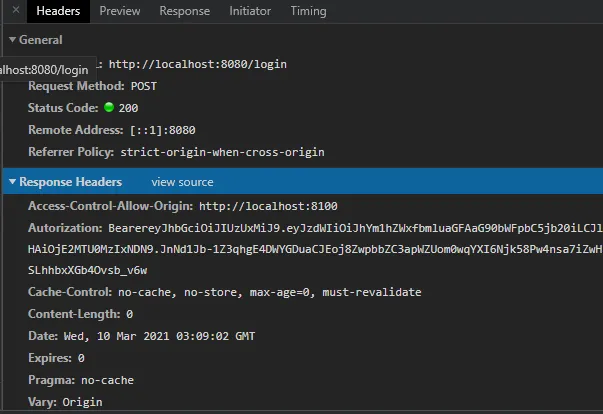
Ve a resposta da requisição na aba Network do Chrome.
AbmaelFerreira
Show, pensei que não estava, retornando, com muito obrigado, acredito que da pra continuar, caso tenha mais dúvidas, abro um novo post
Autorization:

BearereyJhbGciOiJIUzUxMiJ9.eyJzdWIiOiJhYm1hZWxfbmluaGFAaG90bWFpbC5jb20iLCJleHAiOjE2MTU0MzIxNDN9.JnNd1Jb-1Z3qhgE4DWYGDuaCJEoj8ZwpbbZC3apWZUom0wqYXI6Njk58Pw4nsa7iZwHJSLhhbxXGb4Ovsb_v6w