denisspitfire 25 de mar. de 2013
isso nao resolve?
<ScrollView>
    <LinearLayout>
    Layout
    </LinearLayout>
</ScrollView>
denisspitfire 25 de mar. de 2013
posta como voce fez o xml
adriano_servitec 25 de mar. de 2013
denisspitfire:
posta como voce fez o xmlEntão ... fiz assim o XML
<?xml version="1.0" encoding="utf-8"?>
<LinearLayout xmlns:android= "http://schemas.android.com/apk/res/android"
android:layout_width= "fill_parent"
android:layout_height= "wrap_content"
android:background= "#708090"
android:orientation= "vertical" >
<LinearLayout
android:id= "@+id/layoutCabecalho"
android:layout_width= "match_parent"
android:layout_height= "40dp"
android:background= "@drawable/barra"
android:gravity= "center" >
<LinearLayout
android:id= "@+id/layoutCabecalhoEsquerdo"
android:layout_width= "wrap_content"
android:layout_height= "match_parent"
android:layout_weight= "1"
android:gravity= "center_vertical|left" >
<Button
android:id= "@+id/botaoVoltar"
android:layout_width= "match_parent"
android:layout_height= "match_parent"
android:layout_weight= "1"
android:text= "Voltar"
android:textSize= "14sp" />
</LinearLayout>
<LinearLayout
android:id= "@+id/layoutCabecalhoCentro"
android:layout_width= "wrap_content"
android:layout_height= "match_parent"
android:layout_weight= "1"
android:gravity= "center" >
<TextView
android:id= "@+id/textoTitulo"
android:layout_width= "wrap_content"
android:layout_height= "wrap_content"
android:text= "Informações"
android:textAppearance= "?android:attr/textAppearanceLarge"
android:textColor= "#FFFFFF" />
</LinearLayout>
<LinearLayout
android:id= "@+id/layoutCabecalhoDireito"
android:layout_width= "wrap_content"
android:layout_height= "match_parent"
android:layout_weight= "1"
android:gravity= "center_vertical|right" >
</LinearLayout>
</LinearLayout>
<ScrollView
android:id= "@+id/scrollView1"
android:layout_width= "fill_parent"
android:layout_height= "wrap_content" >
<LinearLayout
android:layout_width= "match_parent"
android:layout_height= "match_parent"
android:orientation= "vertical" >
<LinearLayout
android:id= "@+id/listaclientes"
android:layout_width= "wrap_content"
android:layout_height= "match_parent"
android:layout_weight= "1"
android:orientation= "vertical" >
<LinearLayout
android:id= "@+id/LinearLayout04"
android:layout_width= "match_parent"
android:layout_height= "wrap_content"
android:background= "@drawable/shapetextview2"
android:gravity= "center" >
<TextView
android:id= "@+id/TextView01"
android:layout_width= "wrap_content"
android:layout_height= "wrap_content"
android:text= "Cliente"
android:textAppearance= "?android:attr/textAppearanceLarge"
android:textColor= "#FFFFFF" />
</LinearLayout>
<ListView
android:id= "@+id/ListViewInformacoesCliente"
android:layout_width= "wrap_content"
android:layout_height= "wrap_content"
android:background= "@drawable/shapetextview"
android:divider= "#FFFFFF"
android:scrollbars= "none" >
</ListView>
</LinearLayout>
<LinearLayout
android:id= "@+id/listatelefone"
android:layout_width= "match_parent"
android:layout_height= "match_parent"
android:layout_weight= "1"
android:orientation= "vertical" >
<LinearLayout
android:id= "@+id/LinearLayout01"
android:layout_width= "match_parent"
android:layout_height= "wrap_content"
android:background= "@drawable/shapetextview2"
android:gravity= "center" >
<TextView
android:id= "@+id/TextView02"
android:layout_width= "wrap_content"
android:layout_height= "wrap_content"
android:text= "Telefone(s)"
android:textAppearance= "?android:attr/textAppearanceLarge"
android:textColor= "#FFFFFF" />
</LinearLayout>
<ListView
android:id= "@+id/ListViewInformacoesTelefone"
android:layout_width= "fill_parent"
android:layout_height= "fill_parent"
android:background= "@drawable/shapetextview"
android:scrollbars= "vertical" >
</ListView>
</LinearLayout>
<LinearLayout
android:id= "@+id/listadetalhes"
android:layout_width= "wrap_content"
android:layout_height= "match_parent"
android:layout_weight= "1"
android:orientation= "vertical" >
<LinearLayout
android:id= "@+id/LinearLayout02"
android:layout_width= "match_parent"
android:layout_height= "wrap_content"
android:background= "@drawable/shapetextview2"
android:gravity= "center" >
<TextView
android:id= "@+id/TextView03"
android:layout_width= "wrap_content"
android:layout_height= "wrap_content"
android:text= "Detalhes"
android:textAppearance= "?android:attr/textAppearanceLarge"
android:textColor= "#FFFFFF" />
</LinearLayout>
<ListView
android:id= "@+id/ListViewDetalhesClientes"
android:layout_width= "wrap_content"
android:layout_height= "wrap_content"
android:background= "@drawable/shapetextview" >
</ListView>
</LinearLayout>
<LinearLayout
android:id= "@+id/listavendasgeral"
android:layout_width= "wrap_content"
android:layout_height= "match_parent"
android:layout_weight= "1"
android:orientation= "vertical" >
<LinearLayout
android:id= "@+id/LinearLayout05"
android:layout_width= "match_parent"
android:layout_height= "wrap_content"
android:background= "@drawable/shapetextview2"
android:gravity= "center" >
<TextView
android:id= "@+id/TextView05"
android:layout_width= "wrap_content"
android:layout_height= "wrap_content"
android:text= "Vendas - Geral"
android:textAppearance= "?android:attr/textAppearanceLarge"
android:textColor= "#FFFFFF" />
</LinearLayout>
<ListView
android:id= "@+id/ListView02"
android:layout_width= "wrap_content"
android:layout_height= "wrap_content"
android:background= "@drawable/shapetextview" >
</ListView>
</LinearLayout>
<LinearLayout
android:id= "@+id/listavendasdetalhado"
android:layout_width= "wrap_content"
android:layout_height= "match_parent"
android:layout_weight= "1"
android:orientation= "vertical" >
<LinearLayout
android:id= "@+id/LinearLayout03"
android:layout_width= "match_parent"
android:layout_height= "wrap_content"
android:background= "@drawable/shapetextview2"
android:gravity= "center" >
<TextView
android:id= "@+id/TextView04"
android:layout_width= "wrap_content"
android:layout_height= "wrap_content"
android:text= "Vendas - Detalhado"
android:textAppearance= "?android:attr/textAppearanceLarge"
android:textColor= "#FFFFFF" />
</LinearLayout>
<ListView
android:id= "@+id/ListView01"
android:layout_width= "wrap_content"
android:layout_height= "wrap_content"
android:background= "@drawable/shapetextview" >
</ListView>
</LinearLayout>
</LinearLayout>
</ScrollView>
</LinearLayout>
Tentei mudar para ExpandableListView só que deu erro quando chamo aqui
Obrigado.
denisspitfire 25 de mar. de 2013
mas ainda esta como listView
adriano_servitec 25 de mar. de 2013
denisspitfire:
mas ainda esta como listViewNão entendi a sua pergunta.
adriano_servitec 25 de mar. de 2013
thiago.filadelfo:
Olá
Então eu fiz uma coisa quase igual, eu tinha um cabeçalho e uma lista logo abaixo, dai precisava scrolar a tela…
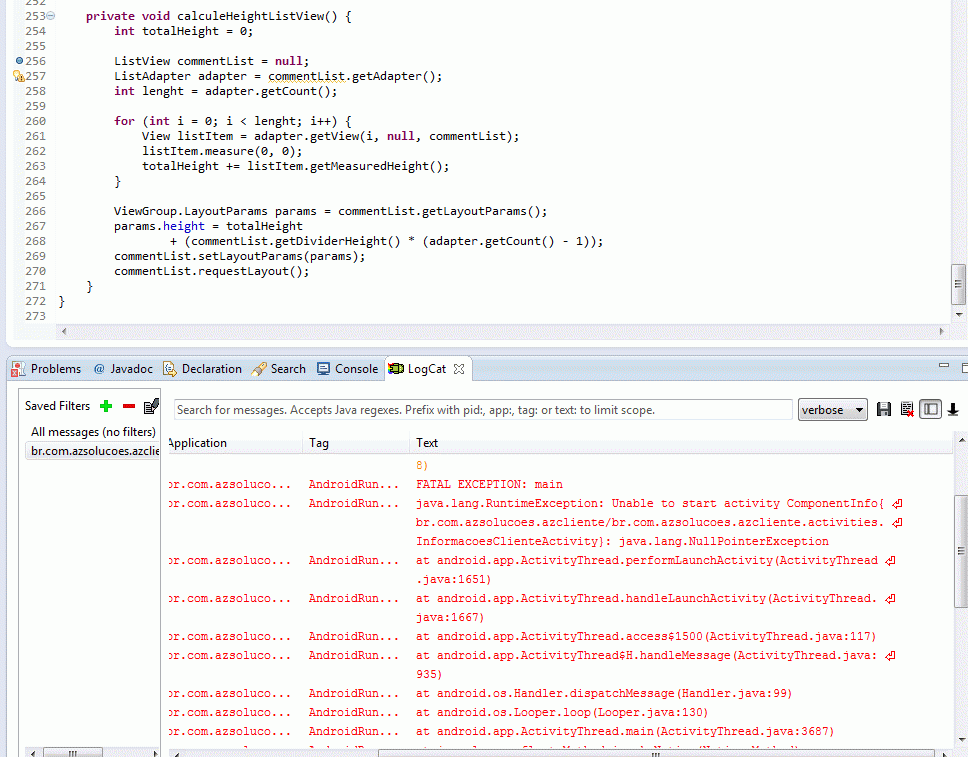
Dai fiz um método que calcula o tamanho do listview, logo depois de setar os itens… segue o trecho do código que realizada o cálculo.
Não sei se é o melhor jeito, mas funcionou para mim…
Espero ter ajudado,
Olá, tentei adaptar esta função sua aqui, mais da erro.
Obrigado.
adriano_servitec 25 de mar. de 2013
thiago.filadelfo:
adriano_servitec
Por favor poderia postar o erro exibido?
No aguardo,
Então Thiago, não manjo quase nada de java, então pode ser que tenha feito algo errado
Fiz o método conforme vc postou ai ai coloquei a variavel como ListView ListView commentList Não sei se esta certo isso, mais quando chega aqui ListAdapter adapter = commentList.getAdapter(); causa o erro conforme logcat.
Estou chamando este método no onCreate da tela.
Obrigado.
adriano_servitec 26 de mar. de 2013
Maravilha thiago.filadelfo deu certo. Muito obrigado.
Somente deu um pequeno problema que na lista do telefone, o ultimo sempre corta um pouco das letras.
adriano_servitec 26 de mar. de 2013
thiago.filadelfo:
Olá
Então acho que tem duas formas de resolver:
Ajuste no totalHeight;
params.height = totalHeight + (commentList.getDividerHeight()) * (adapter.getCount() - 1);
Você faz isso um magic numero (ajuste), eu chutei 10… mas tem que ir vendo.
Talvez seja uma solução, deixar no seu layout.xml (tela), ajustar o seu list para os height e width = match_parent
& lt ; ListView
android : id = "@+id/detail_timelineview_comments"
android : layout_width = "match_parent"
android : layout_height = "match_parent"
android : background = "@drawable/layout_style_footer_post"
android : choiceMode = "none"
android : scrollbars = "none" & gt ;
& lt ; / ListView & gt ;
Espero que funcione, eu tenho certeza que a primeira solução dá certo, mas a segunda não sei, é meio ruim, mas as vezes acontece…
abraços
Ótimo thiago.filadelfo, a primeira solução resolveu.
Muito obrigado amigo.