Posicionar Elementos no container View em React- Native

5 respostas Resolvido
react-native
C

Olá! amigos!!!

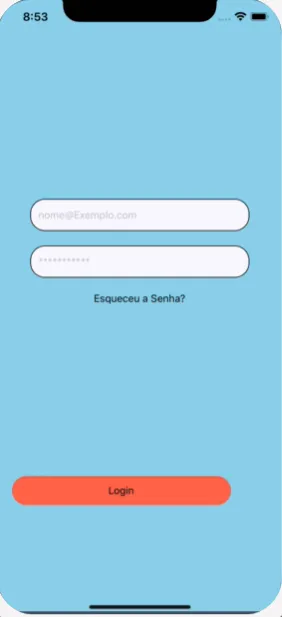
Estou trabalhando em um projeto, onde estou criando uma tela de login, sou iniciante em react e estou tendo problemas para posicionar os elementos que aparecem na tela da maneira como desejo, eles estão ficando apenas alinhado no centro da tela e os comandos que estou usando para reposicionar não estão respondendo.

Será que podem me ajudar, Segue o meu codigo :

import React, { Component } from 'react';
import { Alert, Button, TextInput, View, StyleSheet, Text,Image } from 'react-native';
import { TouchableHighlight } from 'react-native'


export default class App extends Component {
  constructor(props) {
    super(props);
    
    this.state = {
      username: '',
      password: '',
    };
  }
  
  onLogin() {
    const { username, password } = this.state;

    Alert.alert('Credentials', `${username} + ${password}`);
  }


  render() {
    return (
      <View style={styles.container}>
        <TextInput
          value={this.state.username}
          onChangeText={(username) => this.setState({ username })}
          placeholder={'[email removido]'}
          style={styles.input}
        />
        <TextInput
          value={this.state.password}
          onChangeText={(password) => this.setState({ password })}
          placeholder={'***********'}
          secureTextEntry={true}
          style={styles.input}
        />
        
        <TouchableHighlight onPress={clickHandler} style={styles.botton}>
                 <Text>
                    Login
                </Text>
        </TouchableHighlight>

        <TouchableHighlight style={styles.resetpass}>
                 <Text>
                 
                 Esqueceu a Senha?
                 </Text>
        </TouchableHighlight>
        
      <Image source={{uri:''}} style={{ width: 200, height: 150, bottom: 350, alignItems:'center'}} />

      </View>
      
    );
  }
}

const styles = StyleSheet.create({
  container: {
    flex: 1,
    alignItems: 'center',
    justifyContent: 'center',
    backgroundColor: '#87CEEB',
    

resetpass:{
 position: 'absolute',
  width: 300,
  height: 40,
  alignItems: 'center',
  justifyContent: 'center',
  right: 60,
  bottom: 180,

}

  },
  input: {

    width: 300,
    height: 44,
    padding: 10,
    borderWidth: 1,
    borderColor: 'black',
    backgroundColor: '#F8F8FF',
    
  
    borderRadius: 20,

    marginBottom: 20,
    
  },

  botton: {

  position: 'absolute',
  width: 300,
  height: 40,
  alignItems: 'center',
  justifyContent: 'center',
  right: 40,
  bottom: 40,
  backgroundColor:'#FF6347',
  borderRadius:50,

  }


});
const clickHandler = () =>{

   alert('Login efetuado');

  };

5 Respostas

rodriguesabner

mostra print de como está e como vc quer q fique

C

está dessa forma, porém quero descer os campos de input e-mail e senha para baixo na tela proximo ao botão Login, e reposicionar o campo “esqueceu a senha” também, porém os comandos para posicionar os elementos na tela não respondem, apenas continua centralizado no meio da tela

rodriguesabner
Solucao aceita

se vc tá começando agora, pq ta usando o Class? Vai ser bem mais dificil o seu entendimento.

Outra coisa, ainda não ficou claro como vc quer deixar, e os componentes não estavam “respondendo” pq vc tava usando o layout absolute, o uso dele é pra itens especificos, tipo um pontinho de notificação, ou um elemento que precisa se sobresair do resto


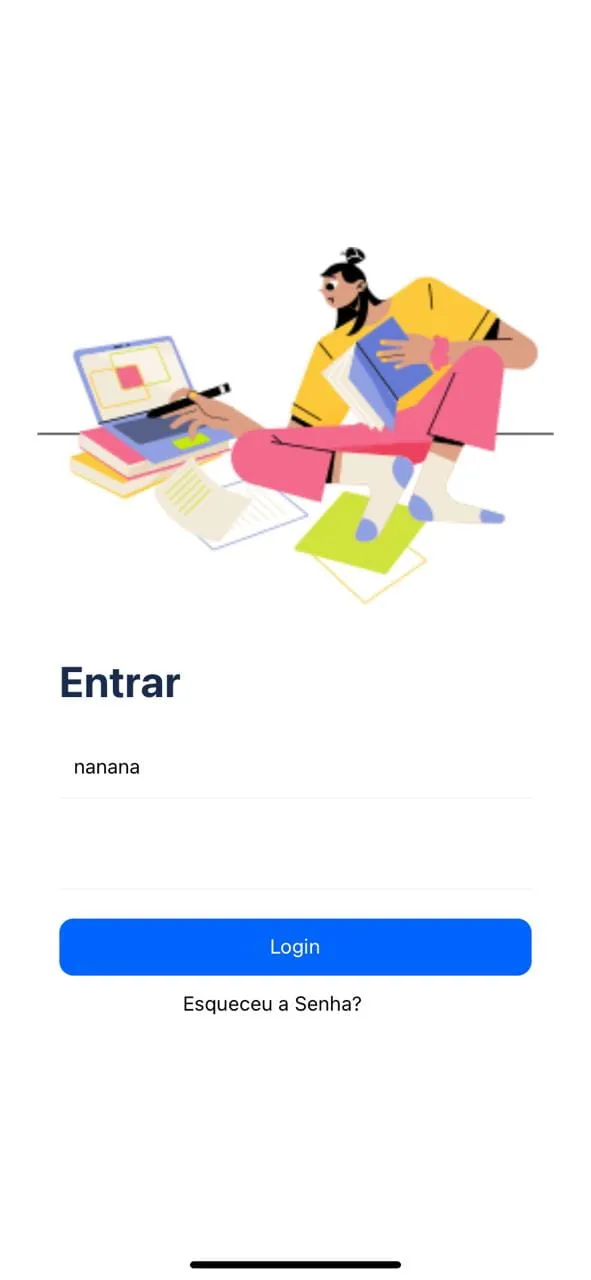
enfim, fiz assim (tá tudo centralizado pq nao ficou claro como vc queria que ficasse), mudei o layout tbm:

Screenshot

import React, {useState} from 'react';
import {Alert, Image, StyleSheet, Text, TextInput, TouchableHighlight, View} from 'react-native';

function App() {
    const [username, setUsername] = useState("");
    const [password, setPassword] = useState("");

    const onLogin = () => {
        Alert.alert('Credentials', `${username} + ${password}`);
    }

    return (
        <View style={styles.container}>
            <Image
                source={{uri: 'https://ouch-cdn2.icons8.com/GYJSGhXoCNlII5OysQnnG37FDKNFWzEa02yehxUNXr4/rs:fit:256:177/czM6Ly9pY29uczgu/b3VjaC1wcm9kLmFz/c2V0cy9zdmcvNzcw/LzVjNDZiNDcxLTkz/ZDktNGY4My1iMzY2/LWE1MDg2MWQzZjFi/NS5zdmc.png'}}
                style={styles.topImage}
            />
            <View style={styles.wrapper}>
                <Text style={styles.title}>
                    Entrar
                </Text>

                <TextInput
                    value={username}
                    onChangeText={setUsername}
                    placeholder={'[email removido]'}
                    style={styles.input}
                    secureTextEntry={false}
                />

                <TextInput
                    value={password}
                    onChangeText={setPassword}
                    placeholder={'***********'}
                    secureTextEntry={true}
                    style={styles.input}
                />

                <TouchableHighlight
                    onPress={() => onLogin()}
                    style={styles.loginBtn}
                >
                    <Text style={styles.textLoginBtn}>
                        Login
                    </Text>
                </TouchableHighlight>

                <TouchableHighlight
                    style={styles.resetPasswordBtn}
                >
                    <Text>
                        Esqueceu a Senha?
                    </Text>
                </TouchableHighlight>
            </View>
        </View>
    );
}

const styles = StyleSheet.create({
    container: {
        flex: 1,
        alignItems: 'center',
        justifyContent: 'center',
        backgroundColor: '#fff',
    },
    topImage: {
        width: '100%',
        height: 250,
        resizeMode: 'contain',
        marginBottom: 36
    },
    wrapper: {
        maxWidth: '80%',
        width: '100%',
        justifyContent: 'center',
    },
    title: {
        fontSize: 30,
        fontWeight: 'bold',
        color: "#1a2c4d",
        marginBottom: 20
    },
    input: {
        width: '100%',
        height: 44,
        padding: 10,
        borderBottomWidth: 1,
        borderColor: '#F2F4F6',
        marginBottom: 20,
    },
    loginBtn: {
        width: "100%",
        height: 40,
        alignItems: 'center',
        justifyContent: 'center',
        backgroundColor: '#0164fd',
        borderRadius: 10,
    },
    textLoginBtn: {
        color: '#fff',
    },
    resetPasswordBtn: {
        width: 300,
        height: 40,
        alignItems: 'center',
        justifyContent: 'center',

    },
});

export default App;
C

Cara acabei usando por que foi como vi um cara fazendo em um tutorial, mas valeu mesmo está bem mais perto do que eu queria agora, obrigado pelas dicas!

Você sabe algum tutorial, canal no YT ou algum forum sobre React para iniciantes, se puder me indicar algum agradeço.

Novamente vlw pela ajuda!

rodriguesabner

Cara, não manjo, mas muita gente fala dos vídeos da rocketseat, tem conteúdo no yt também

Criado 10 de maio de 2022
Ultima resposta 16 de mai. de 2022
Respostas 5
Participantes 2