darlan_machado 23 de jan. de 2020
guilhermebhte 23 de jan. de 2020
Então entendi que o HttpClient é o substituto do Http , por ter métodos mais atrativos e um melhoramento do Http .
O meu service está assim:
import { Injectable } from '@angular/core' ;
import { HttpClient , HttpHeaders } from '@angular/common/http' ;
import { User } from '../model/user.model' ;
import { headerJson , USUARIOS_API_LOGIN } from './usuarios.api' ;
@Injectable ({
providedIn : 'root'
})
export class UserService {
constructor ( private http : HttpClient ) {}
login ( user : User ) {
return this . http . post ( `$ { USUARIOS_API_LOGIN } ` , user , { headers : headerJson });
}
}
E o arquivo usuarios.api.ts está assim, que é importado no meu service.
import { HttpHeaders } from '@angular/common/http' ;
export const USUARIOS_API = ` localhost : 8090 ` ;
export const USUARIOS_API_LOGIN = `$ { USUARIOS_API } / api / auth ` ;
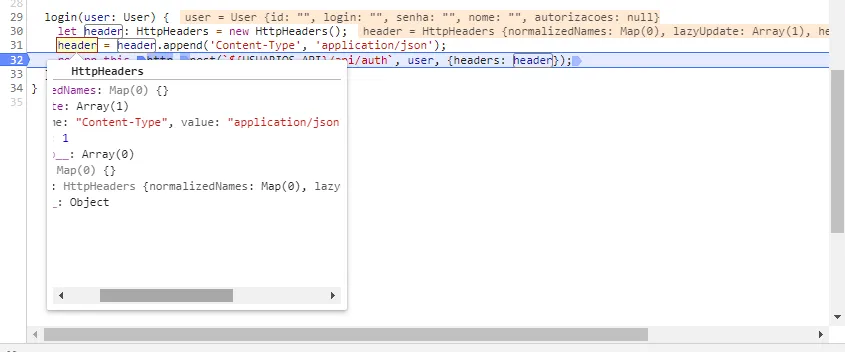
const header : HttpHeaders = new HttpHeaders ();
export const headerJson = header . append ( 'Content-Type' , 'application/json' );
Agora só não estou conseguindo chamar meu backend.
guilhermebhte 24 de jan. de 2020
darlan_machado 24 de jan. de 2020
O último projeto em angular 2+ que fiz (usando angular 7), usei HttpClient sem problemas:
import { HttpClient , HttpHeaders } from '@angular/common/http' ;
constructor ( private http : HttpClient ) { }
return this . http . post < any > ( BASE_URL + path , data , this . httpOptions ) . pipe (
retry ( 1 ),
catchError ( this . errorHandler )
);
Talvez seja necessário revisar e identificar o que causa esse comportamento.
guilhermebhte 24 de jan. de 2020
Estou achando esquisito. O que tem nas variáveis this.httpOptions e this.errorHandler ?
darlan_machado 24 de jan. de 2020
E
{
let errorMessage = '';
if(error.error instanceof ErrorEvent) {
errorMessage = error.error.message;
} else {
errorMessage = `Error Code: ${ error . status } \nMessage: ${ error . message } `;
}
console.log(errorMessage);
return throwError(errorMessage);
}
guilhermebhte 24 de jan. de 2020
Obrigado.
Vou testar aqui.
guilhermebhte 24 de jan. de 2020
Mesmo erro.
Após rodar seu código o console mostrou:
Error Code: 0 Message: Http failure response for localhost:8090/api/auth: 0 Unknown Error POST localhost:8090/api/auth net::ERR_FAILED
O backend é java
Filter do java que foi implementado
package br.com.ghsistemas.usuarios.filter ;
import lombok.extern.apachecommons.CommonsLog ;
import org.springframework.core.annotation.Order ;
import org.springframework.stereotype.Component ;
import javax.servlet.* ;
import javax.servlet.http.HttpServletRequest ;
import javax.servlet.http.HttpServletResponse ;
import java.io.IOException ;
import static org.springframework.core.Ordered.HIGHEST_PRECEDENCE ;
@Component
@Order ( HIGHEST_PRECEDENCE )
@CommonsLog
public class SmpleCORSFilter implements Filter {
@Override
public void init ( FilterConfig filterConfig ) throws ServletException {
log . info ( "Sistema de usuários | SmpleCORSFilter início" );
}
@Override
public void doFilter ( ServletRequest req ,
ServletResponse resp ,
FilterChain chain ) throws IOException , ServletException {
HttpServletRequest request = ( HttpServletRequest ) req ;
HttpServletResponse response = ( HttpServletResponse ) resp ;
response . setHeader ( "Access-Control-Allow-Origin" , "*" );
response . setHeader ( "Access-Control-Allow-Methods" , "POST, GET, OPTIONS, DELETE, PUT" );
response . setHeader ( "Access-Control-Max-Age" , "3600" );
response . setHeader ( "Access-Control-Allow-Headers" , "x-requested-with, authorization, Content-Type, Authorization" );
if ( "OPTIONS" . equalsIgnoreCase ( request . getMethod ())) {
response . setStatus ( HttpServletResponse . SC_OK );
} else {
chain . doFilter ( req , resp );
}
}
@Override
public void destroy () {
}
}
Alguma ideia a mais ?
darlan_machado 24 de jan. de 2020
Você consegue acessar esse endpoint a partir de um outro sistema, como postman ou afim?
guilhermebhte 24 de jan. de 2020
Outro sistema eu não testei, pois ele é para este fim.
postman sim.
guilhermebhte 24 de jan. de 2020
Access to XMLHttpRequest at ‘localhost:8090/api/auth’ from origin ‘http://localhost:4200 ’ has been blocked by CORS policy: Cross origin requests are only supported for protocol schemes: http, data, chrome, chrome-extension, https.
javaflex 25 de jan. de 2020
Você já não tinha resolvido isso em outro post?
guilhermebhte 25 de jan. de 2020
Eu achei que tinha.
Estava testando em dois projetos um Http e outro ser HttpClient . Por isso abri este.
guilhermebhte 28 de jan. de 2020
javaflex 28 de jan. de 2020
Segue algum tutorial do zero e só depois aplique a seu projeto. Senão embola tudo mesmo.
gbuenoo 28 de jan. de 2020
Se esse é o erro, que aparece quando você faz a requisição a partir do seu front-end, seu problema é CORS.
O seu “SmpleCORSFilter” não tem efeito algum nesse momento(ainda). Afinal a sua requisição é barrada ao ser recebida e não ao ser respondida. O contexto de uso do que está implementado nele, é um pouco diferente.
Acredito que esses link’s, possam te ajudar a entender o que tem que ser feito para habilitar o CORS:
Enabling Cross Origin Requests for a RESTful Web Service
Configurar os cors no Spring Boot
E talvez esse link, te ajude a entender o que a implementação do seu “SmpleCORSFilter” faz:How does Access-Control-Allow-Origin header work?
guilhermebhte 28 de jan. de 2020
Então hoje meu CORS está assim:
package br.com.ghsistemas.usuarios.filter ;
import lombok.extern.apachecommons.CommonsLog ;
import org.springframework.core.annotation.Order ;
import org.springframework.stereotype.Component ;
import javax.servlet.* ;
import javax.servlet.http.HttpServletRequest ;
import javax.servlet.http.HttpServletResponse ;
import java.io.IOException ;
import static org.springframework.core.Ordered.HIGHEST_PRECEDENCE ;
@Component
@Order ( HIGHEST_PRECEDENCE )
@CommonsLog
public class SmpleCORSFilter implements Filter {
@Override
public void init ( FilterConfig filterConfig ) throws ServletException {
log . info ( "Sistema de usuários | SmpleCORSFilter início" );
}
@Override
public void doFilter ( ServletRequest req ,
ServletResponse resp ,
FilterChain chain ) throws IOException , ServletException {
HttpServletRequest request = ( HttpServletRequest ) req ;
HttpServletResponse response = ( HttpServletResponse ) resp ;
response . setHeader ( "Access-Control-Allow-Origin" , "*" );
response . setHeader ( "Access-Control-Allow-Methods" , "POST, GET, OPTIONS, DELETE, PUT" );
response . setHeader ( "Access-Control-Max-Age" , "3600" );
response . setHeader ( "Access-Control-Allow-Headers" , "x-requested-with, authorization, Content-Type, Authorization" );
if ( "OPTIONS" . equalsIgnoreCase ( request . getMethod ())) {
response . setStatus ( HttpServletResponse . SC_OK );
} else {
chain . doFilter ( req , resp );
}
}
@Override
public void destroy () {
}
}
O que funciona para o Angular Http e para Angular HttpClient não ?
Já imagina isso.
Mas vou fazer os testes e coloco o resultado aqui.
Mas pelo que entendi, estes dois links que passou a implementação é diferente, do que tenho implementado.
No mais obrigado.
Solucao aceita
gbuenoo 28 de jan. de 2020 1 like
Observando esse erro:
Cross origin requests are only supported for protocol schemes: http, data, chrome, chrome-extension, https.
E observando sua implementação:
Você tentou colocar HTTP na sua constante “USUARIOS_API” ? Ficando assim:export const USUARIOS_API = 'http://localhost:8090';
guilhermebhte 28 de jan. de 2020
guilhermebhte 28 de jan. de 2020 1 like
Tudo por causa do http:// .
Mas simples coisas mudam o mundo.
Obrigado @gbuenoo , por notar.
Não precisei de mudar o CORS .